
Directions to apply for an initial Montessori teacher license
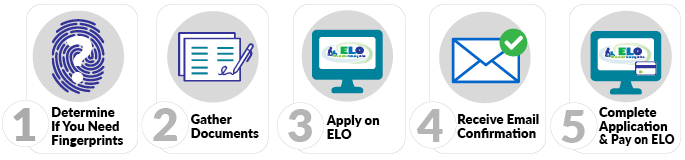
1. Determine if you must submit fingerprints
- Use the fingerprint decision tree to determine if this step is needed. If you have determined that you need fingerprints, submit them electronically via our vendor Fieldprint by following the Electronic Fingerprint Submission directions.
2. Gather Documents
Scan all documentation into files (.pdf, .doc/docx, .jpg/jpeg, or .txt) that are 2MB or less in size
- Preview the ELO Conduct & Competency Questions to see if you will need to provide documentation of any alleged misconduct.
- PI 1612-T Institutional Endorsement and Assurances form
- Transcripts (bachelors degree plus prep program if not part of bachelors) - please see our Transcripts web page for information on what is acceptable. Transcript should include documentation of completion of a course in special education for which at least 3 postsecondary credits were earned.
- Test score reports
- Praxis II Elementary Education Content Knowledge (5014) and/or Praxis II Middle School Content Knowledge test (5146), depending on Montessori level
- Wisconsin Foundations of Reading Test
3. Log in to Educator Licensing Online (ELO)
- Within ELO, make sure you have answered the three onboarding questions.
- Find the APPLY FOR A NEW LICENSE section of the Quick Start Menu. Select the same choices in the three drop-downs in the application screenshot below:
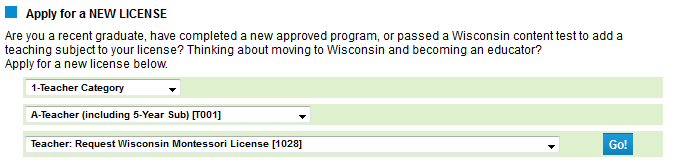
- Choose "1-Teacher Category"
- Choose "A-Teacher (including 5-Year Sub) [T001]"
- Choose "Teacher: Request Wisconsin Montessori License [1028]"
- Click the “GO!” button.
- Complete each page of the application as instructed. Review your Application Summary and edit information if necessary OR click the “SUBMIT” button to submit your application.
4. Receive Email Confirmation
5. Complete Application on ELO
- Click the GO! button next to “Submit C&C and Payment to Complete Application.”
- Review your fees.
- Complete the Conduct and Competency Questionnaire (14 questions).
- Pay with a credit card or pre-paid card. For fee amounts and additional payment information please see License Application Fees.
PROCESSING TIMES
Our processing times vary throughout the year. For current processing times see Check Application Status.